How It Works
This page provides a high-level overview of the two core flows that make up the Age Verification Solution: how a user obtains a Proof of Age attestation, and how they present it to an online service. For detailed technical specifications, see the Architecture and AV Profile.
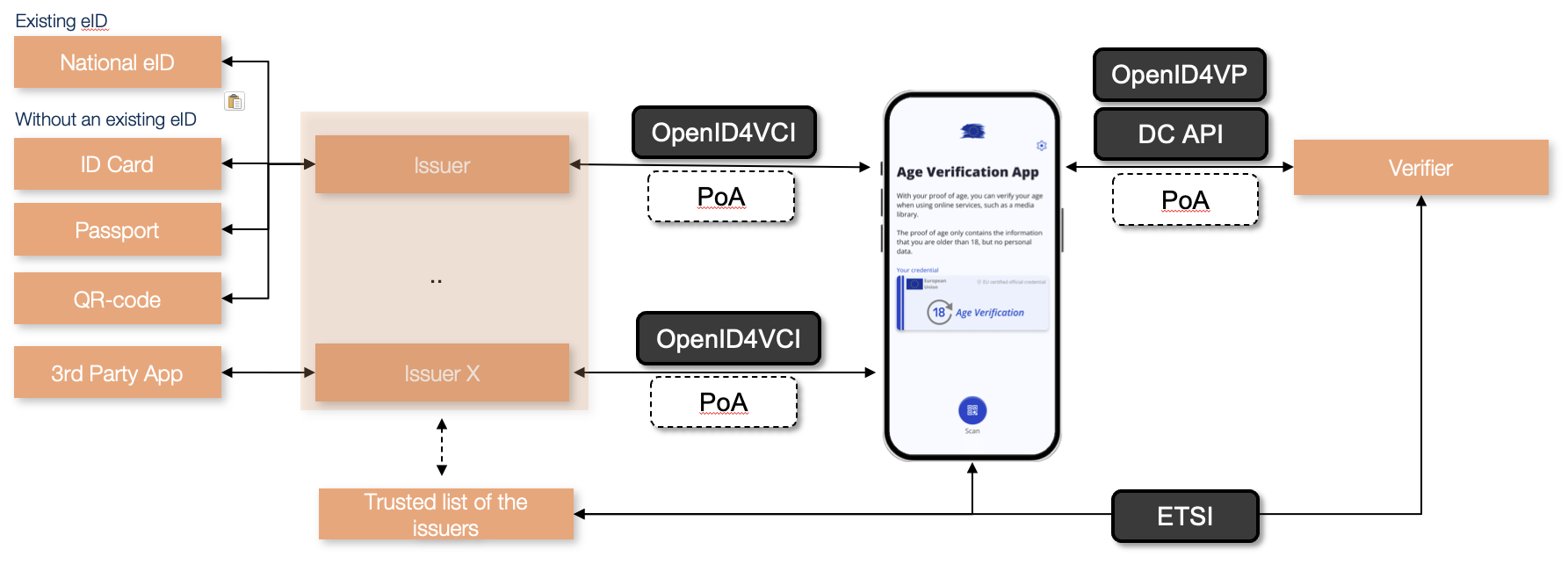
Issuance: Obtaining a Proof of Age Attestation
Before a user can verify their age to any online service, they must obtain a Proof of Age attestation from an issuer and store it in the Age Verification App on their mobile device.
The issuer must verify the user's identity reliable before issuing an attestation. The choice of enrolment method is the issuer's responsibility. Any method that meets at least the level of assurance substantial is acceptable.
The open-source blueprint provides reference implementations for the following enrolment methods as a starting point:
- National eID: the user authenticates via a national electronic identity scheme.
- Passport or identity card: the user scans their passport or ID card using the app. The user's identity and liveness are verified by comparing the portrait in the travel document to a selfie taken with the app. The proof of age is issued based on the date of birth in the travel document.
- Over the counter: identity verification takes place in person at a service point, such as a postal office or citizen service centre. The clerk verifies the user's identity and age out of band, and the user receives a QR code or token to retrieve the attestation in the app.
- Third-party application: identity verification is conducted via an existing trusted application, such as a banking app or mobile network operator service, that has already identified the user at a sufficient level of assurance.
In the blueprint, attestations are issued using OpenID for Verifiable Credential Issuance (OpenID4VCI) and follow the ISO mDoc format. Each attestation is digitally signed by the issuer, which allows verifiers to confirm that it was issued by a trusted and authorised party. The attestation contains no personal data; only the age attributes, such as age_over_18: true.
The sequence diagram below shows the main interactions between the components during issuance.
sequenceDiagram
  participant U as User
  participant A as AV App
  participant I as Issuer
  participant TL as Trusted List

  note over I,TL: Prerequisite: done once before going live
  I->>TL: Register as authorised issuer

  note over U,TL: Issuance
  U->>A: Start enrolment
  A->>I: Request attestations (OpenID4VCI)
  I-->>A: Issue signed batch (mDoc)
  A-->>U: Attestations stored, ready to use
Presentation: Proving Age to an Online Service
When a user wants to access an age-restricted service, the verifier requests a Proof of Age attestation from the app. The app presents the attestation, the verifier validates it, and access is granted or denied. No personal data is shared and the verifier receives only a confirmation that the age threshold is met.
The presentation can use one of two methods, and the attestation can take one of two forms.
- DC API (W3C Digital Credentials API) is a browser-integrated API that enables direct communication between the verifier and the user's app, on the same device or across devices. It provides the smoothest user experience and is the primary method. In a cross-device flow, Bluetooth must be active on both devices and this proximity check adds a layer of security by confirming the devices are physically co-located.
- OID4VP (OpenID for Verifiable Presentations) is used as a fallback when the user's browser does not support DC API. The app is invoked via a custom URL scheme and the attestation is transmitted through a secure standards-based exchange.
- Standard mdoc attestation is a signed credential confirming the user meets the age threshold. To prevent users from being tracked across services, attestations are single-use and issued in batches so the app always has one ready when needed.
- Zero-Knowledge Proof (ZKP) provides the same yes/no confirmation without transmitting the attestation itself and no linkable identifier is ever disclosed and the user cannot be tracked across services or sessions. ZKP is available when using DC API and when the app supports it. When available, it should be preferred.
The sequence diagram below shows how the components interact during presentation.
sequenceDiagram
  participant U as User
  participant A as AV App
  participant V as Verifier
  participant TL as Trusted List

  note over V,TL: Prerequisite: cached regulary (e.g. every 4–6 hours)
  V->>TL: Download Trusted List
  TL-->>V: Return Trusted List (cached locally)

  note over U,TL: Presentation
  U->>V: Access age-restricted service
  V->>A: Request Proof of Age (DC API / OID4VP)
  A-->>U: Confirm presentation
  U->>A: Approve
  A-->>V: Present attestation (mDoc / ZKP)
  V->>V: Validate against cached Trusted List
  V-->>U: Access granted or denied
Trust Framework
For a verifier to trust a Proof of Age attestation, it needs to know that the issuer who signed it is legitimate and authorised. This is the role of the AV Trusted List — a list of authorised issuers maintained by the European Commission as part of the eIDAS infrastructure.
Every issuer must be registered on the Trusted List before it can issue attestations that verifiers will accept. Every verifier must check the Trusted List when validating a presented attestation. This creates a common trust anchor for the entire ecosystem, enabling attestations issued in one Member State to be accepted by verifiers across the EU.
See the AV Trusted List for more information.